What protects what, what is wired into the shipped app, and which claims have tests.
This page shows which protections exist, which of them the shipped app actually uses, and which have tests behind them. Every claim in this section comes from code and tests in the OMS launch repository. “Covered by tests: yes” means a test exercises the behavior, not that the whole claim is proven. The tests were read, not run.
What is and is not connected
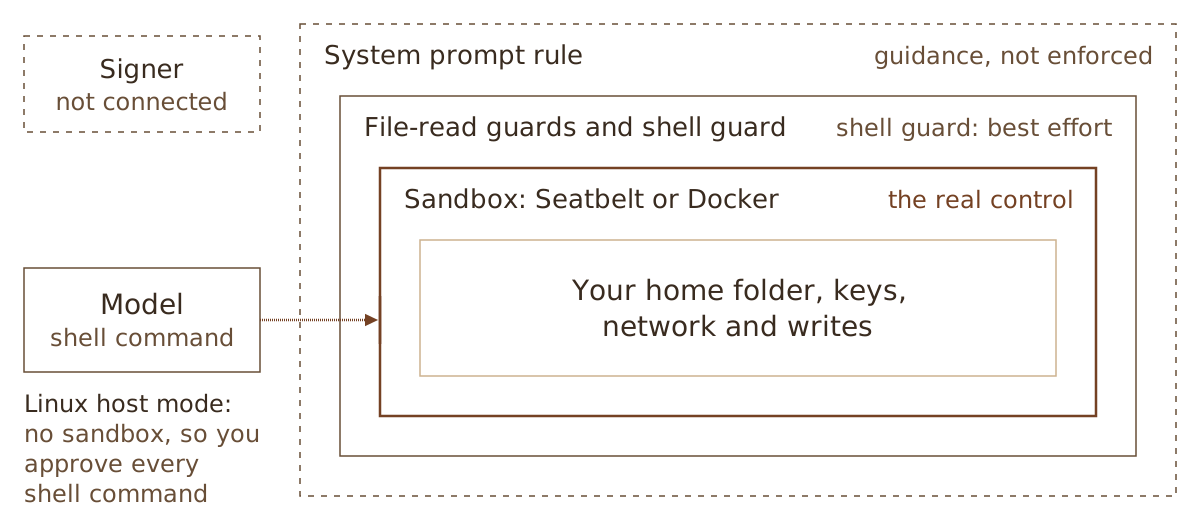
The separate signer exists as a package and is included in the release build, but the shipped app does not use it. The CLI help says “Signing and workspace-secret access are unavailable.” The terminal app has no signer connection.
OMS never holds mainnet keys, and it hands mainnet work to you as a transaction to sign. No test asserts either statement.
The prompt rule is guidance. The guards enforce, and the shell guard is best effort. The sandbox is the real control.
The shell guard is “best effort by construction”, so the real control is the operating system sandbox or Docker. On Linux in host mode there is no sandbox. In that case OMS asks you to approve every model shell command, and the file tools and guards still apply.
Throwaway keypairs
The system prompt tells the model never to read, request, copy, print or use your existing keys, wallets, keypair files, seed phrases or credentials. The model may generate fresh throwaway keypairs in memory or in the task’s temp or work directory, only for tests and local chain setup, and never for devnet or mainnet. A prompt rule is guidance to the model, not an enforced control. The enforcement is in the guards and the sandbox.
Red-team results
Not available. The launch repository has no red-team result files, so no safety claim is made from red-team work.
{"docsConfig":{"theme":"mint","$schema":"https://mintlify.com/docs.json","name":"Oh My Sol","description":"Documentation for Oh My Sol (OMS), a local Solana coding harness from barestate.","colors":{"primary":"#744123","light":"#e9b98a","dark":"#9a5a33"},"logo":{"light":"/logo/barestate-mark.svg","dark":"/logo/barestate-mark-on-dark.svg","href":"/"},"favicon":"/favicon.svg","appearance":{"default":"light"},"background":{"color":{"light":"#fbe3c5","dark":"#1e1b18"}},"navbar":{"primary":{"type":"button","label":"Sign in","href":"https://barestate.xyz/oms/login"}},"footer":{"socials":{"github":"https://github.com/barestate-ai"},"links":[{"header":"Oh My Sol","items":[{"label":"Product page","href":"https://barestate.xyz/oh-my-sol"},{"label":"Quickstart","href":"/quickstart"},{"label":"Sign in","href":"https://barestate.xyz/oms/login"}]},{"header":"Barestate","items":[{"label":"Website","href":"https://barestate.xyz"},{"label":"About","href":"https://barestate.xyz/about"},{"label":"Contact","href":"https://barestate.xyz/contact"}]},{"header":"For agents","items":[{"label":"llms.txt","href":"https://barestate.xyz/llms.txt"},{"label":"API","href":"https://barestate.xyz/openapi.json"}]}]},"seo":{"metatags":{"og:image":"https://barestate.xyz/og/barestate.jpg","og:image:width":"1200","og:image:height":"630","og:image:alt":"Engraving of a mechanical arm polishing a rough stone into a smooth sphere","twitter:image":"https://barestate.xyz/og/barestate.jpg"}},"fonts":{"heading":{"family":"Source Serif 4","weight":400},"body":{"family":"Inter"}},"icons":{"library":"lucide"},"styling":{"eyebrows":"breadcrumbs","codeblocks":"dark"},"contextual":{"options":["copy","view"],"display":"header"},"integrations":{"telemetry":{"enabled":false}},"navigation":{"global":{"anchors":[{"anchor":"barestate","href":"https://barestate.xyz"},{"anchor":"Oh My Sol","href":"https://barestate.xyz/oh-my-sol"}]},"pages":[]}},"deployment":{"deploymentMetadataValue":{"hasAudioNarration":false,"customDomains":[],"gitSource":{"type":"github","owner":"local","repo":"local","deployBranch":"main","contentDirectory":"","isPrivate":true,"mountPath":"","label":"local","isBase":true},"buildId":"local","clientVersion":"0.0.4143"},"basePath":"","hasChatPermissions":false,"hasWebMcpPermissions":false,"toggles":[],"googleFontsInlined":true,"isLoggedInCli":false,"mintExport":{}},"customCss":[{"filePath":"style.css","content":":root{--oms-paper: #fbe3c5;--oms-ink: #392b1f;--oms-muted: #684e37;--oms-line: #cdb28f;--oms-action: #744123;--oms-on-action: #fff4df;--oms-wash: #f6d6b0;--oms-code-bg: #392b1f;--oms-code-fg: #fbe3c5;--oms-serif: 'Source Serif 4', Georgia, 'Times New Roman', serif;--oms-mono: ui-monospace, 'SF Mono', Menlo, Consolas, monospace;--oms-ease: cubic-bezier(0.23, 1, 0.32, 1);--content-width: 44rem}.dark{--oms-paper: #1e1b18;--oms-ink: #f1e4d0;--oms-muted: #c4b098;--oms-line: #433a31;--oms-action: #e9b98a;--oms-on-action: #1e1b18;--oms-wash: #262220;--oms-code-bg: #141210;--oms-code-fg: #f1e4d0}html{-webkit-font-smoothing:antialiased;text-rendering:optimizeLegibility}#header{padding-bottom:2rem;border-bottom:1px solid var(--oms-line)}#header nav[aria-label=\"Breadcrumb\"],.eyebrow{display:none!important}#page-title,[data-layout-item=\"page-header\"] h1{font-family:var(--oms-serif);font-weight:400;font-size:clamp(2.125rem, 1.6rem + 1.8vw, 2.875rem);line-height:1.1;letter-spacing:-0.012em;color:var(--oms-ink);text-wrap:balance}#header .prose p,[data-layout-item=\"page-header\"] p{font-family:var(--oms-serif);font-size:1.25rem;line-height:1.5;color:var(--oms-muted);max-width:38rem;text-wrap:pretty}.mdx-content,.mdx-content p,.mdx-content [data-as=\"p\"],.mdx-content li,.mdx-content td,.mdx-content th,.mdx-content strong{color:var(--oms-ink)}.mdx-content>p,.mdx-content>[data-as=\"p\"],.mdx-content>ul,.mdx-content>ol,.mdx-content>blockquote{max-width:68ch}.mdx-content>p,.mdx-content>[data-as=\"p\"],.mdx-content li{line-height:1.75;text-wrap:pretty}.mdx-content li::marker{color:var(--oms-muted)}.mdx-content a:not(.card a){color:var(--oms-action);text-decoration-color:var(--oms-line);text-underline-offset:3px;border-bottom:0}.mdx-content>h2,.mdx-content>h3,.mdx-content>h4{font-family:var(--oms-serif);color:var(--oms-ink);font-weight:400;letter-spacing:0;text-wrap:balance}.mdx-content>h2{font-size:1.75rem;line-height:1.25;letter-spacing:-0.005em;margin-top:3rem;margin-bottom:1rem;padding-top:1.75rem;border-top:1px solid var(--oms-line)}.mdx-content>h2:first-child{margin-top:0;padding-top:0;border-top:0}.mdx-content>h3{font-size:1.3125rem;line-height:1.35;margin-top:2.25rem;margin-bottom:0.5rem}.mdx-content>h4{font-size:1.0625rem;line-height:1.4;margin-top:1.75rem}.mdx-content blockquote{border-left:2px solid var(--oms-action);padding-left:1.25rem;font-family:var(--oms-serif);font-size:1.125rem;font-style:normal;color:var(--oms-ink)}.mdx-content blockquote p::before,.mdx-content blockquote p::after{content:none}hr,.mdx-content hr{border-color:var(--oms-line)}[data-component-part=\"card-content\"]{color:var(--oms-muted)}[data-layout-item=\"topbar\"] a[href=\"/\"],[data-layout-item=\"topbar\"] a[href=\"/docs\"]{display:inline-flex;align-items:center;gap:12px}[data-layout-item=\"topbar\"] a[href=\"/\"]::after,[data-layout-item=\"topbar\"] a[href=\"/docs\"]::after{content:'Oh My Sol';font-family:var(--oms-serif);font-size:21px;line-height:1;letter-spacing:-0.005em;color:var(--oms-ink);white-space:nowrap;padding:3px 0 3px 12px;border-left:1px solid var(--oms-line)}img.nav-logo{height:1.375rem!important;width:auto!important}#navbar-transition{background:var(--oms-paper)!important;backdrop-filter:none!important;-webkit-backdrop-filter:none!important}#navbar-transition,[data-layout-item=\"topbar\"]{border-color:var(--oms-line)}[data-search-item=\"trigger\"]{border-radius:0!important;border:1px solid var(--oms-line)!important;background:transparent!important}#topbar-cta-button,#topbar-cta-button *{border-radius:0!important}.sidebar-group-header,.sidebar-title{font-family:var(--oms-serif);font-weight:400!important;font-size:15px;letter-spacing:0;color:var(--oms-ink)}#sidebar-content a{border-radius:0}#sidebar-content li:not([data-active])>a{color:var(--oms-muted)}@media (hover: hover) and (pointer: fine){#sidebar-content li:not([data-active])>a:hover{color:var(--oms-ink);background:transparent}}#sidebar-content li[data-active]>a,#sidebar-content li[data-active]>a>div{border-radius:0}#sidebar-content li[data-active]>a{background:transparent!important;color:var(--oms-ink)!important;text-shadow:none!important;font-weight:500;box-shadow:inset 2px 0 0 var(--oms-action)}.nav-anchor>div:first-child{display:none}.nav-anchor{margin-left:1rem}[data-layout-item=\"toc-item-link\"]{color:var(--oms-muted)}toc-item[data-active],.toc-item[data-active],.toc-item[data-active] a,[data-layout-item=\"toc-item\"][data-active] a{color:var(--oms-action)}.card,.callout,.code-block,.accordion,.tabs,.expandable,.frame,[data-component-part=\"step-indicator\"],.update,[data-search-item=\"dialog\"],button,.nav-dropdown-content{border-radius:0!important;box-shadow:none!important}.card{background:transparent!important;border:1px solid var(--oms-line)!important;--tw-ring-color: transparent !important}.card [data-component-part=\"card-content-container\"]{padding:1.125rem 1.25rem 1.25rem!important}.card-group .card{height:calc(100% - 1rem)}.card [data-component-part=\"card-title\"]{font-family:var(--oms-serif);font-size:1.1875rem;font-weight:400;line-height:1.3;letter-spacing:-0.003em;color:var(--oms-ink);margin:0;padding:0 1.75rem 0 0;border:0}.card [data-component-part=\"card-content\"]{margin-top:0.375rem;font-size:14.5px;line-height:1.55;text-wrap:pretty}.card [data-component-part=\"card-content\"] code{font-size:0.82em}@media (hover: hover) and (pointer: fine){.card:hover{border-color:var(--oms-action)!important}}.accordion-group{border:0!important;border-radius:0!important;border-top:1px solid var(--oms-line)!important;border-bottom:1px solid var(--oms-line)!important;margin:1.5rem 0 2rem!important;overflow:visible!important}.accordion-group>details.accordion{border-color:var(--oms-line)!important}.accordion{border:0!important;background:transparent!important;margin:0!important;overflow:visible!important}.mdx-content>.accordion,.mdx-content>details.accordion{border-top:1px solid var(--oms-line)!important;border-bottom:1px solid var(--oms-line)!important;margin:1.5rem 0 2rem!important}.accordion>summary{padding:1rem 0!important;gap:0.875rem!important;background:transparent!important;align-items:baseline!important}.accordion [data-component-part=\"accordion-caret-right\"]{align-self:center}.accordion [data-component-part=\"accordion-caret-right\"] svg{width:11px;height:11px;color:var(--oms-action)!important;transition:transform 200ms var(--oms-ease)!important}.accordion [data-component-part=\"accordion-title\"]{font-family:var(--oms-serif);font-size:1.0625rem;font-weight:400!important;line-height:1.45!important;color:var(--oms-ink)!important;transition:color 160ms var(--oms-ease)}.accordion[open] [data-component-part=\"accordion-title\"]{color:var(--oms-action)!important}.accordion [data-component-part=\"accordion-content\"]{padding:0 0 1.25rem 1.875rem!important;max-width:64ch}.accordion [data-component-part=\"accordion-content\"],.accordion [data-component-part=\"accordion-content\"] p,.accordion [data-component-part=\"accordion-content\"] [data-as=\"p\"]{font-size:15px;line-height:1.7;color:var(--oms-ink)}@media (hover: hover) and (pointer: fine){.accordion>summary:hover [data-component-part=\"accordion-title\"]{color:var(--oms-action)!important}}@media (prefers-reduced-motion: reduce){.accordion [data-component-part=\"accordion-caret-right\"] svg{transition:none!important}}.callout{background:var(--oms-wash)!important;border:0!important;border-left:2px solid var(--oms-muted)!important;padding:1rem 1.25rem 1.0625rem!important;margin-block:1.5rem 1.75rem!important}.callout,.callout *{color:var(--oms-ink)!important}.callout [data-component-part=\"callout-content\"]{font-size:15px;line-height:1.65}.callout svg,[data-component-part=\"callout-icon\"],[data-component-part=\"callout-icon\"] svg{color:var(--oms-muted)!important}.callout[data-callout-type=\"warning\"],.callout[data-callout-type=\"danger\"]{border-left:3px solid var(--oms-action)!important}.callout[data-callout-type=\"warning\"] svg,.callout[data-callout-type=\"danger\"] svg{color:var(--oms-action)!important}[data-component-part=\"step-indicator\"]{background:var(--oms-paper)!important;border:1px solid var(--oms-action);color:var(--oms-action)!important;font-family:var(--oms-serif);font-size:14px!important;font-weight:400!important}[data-component-part=\"step-line\"]{background:var(--oms-line)!important}[data-component-part=\"step-title\"]{font-family:var(--oms-serif);font-size:1.1875rem;font-weight:400!important;line-height:1.35;color:var(--oms-ink)!important}[data-component-part=\"step-content\"]{line-height:1.7}.mdx-content :not(pre)>code{background:var(--oms-wash);border:1px solid var(--oms-line);border-radius:0;color:var(--oms-ink);font-family:var(--oms-mono);font-size:0.85em;padding:1px 5px}.mdx-content :not(pre)>code::before,.mdx-content :not(pre)>code::after{content:none}.mdx-content a :not(pre)>code{color:var(--oms-action)}.code-block,.code-block pre,.code-block code{background:var(--oms-code-bg)!important;font-family:var(--oms-mono)}.code-block{border:1px solid var(--oms-line)!important;--tw-ring-color: transparent !important;margin-block:1.5rem}.code-block pre,.code-block code{color:var(--oms-code-fg)}.code-block pre{font-size:13.5px;line-height:1.7}.code-block div:not([data-floating-buttons]),.code-block pre span.line{background:transparent!important}.code-block span[style*=\"6A9955\"]{color:#a3c28f!important}.code-group{border-radius:0!important}.code-group{background:var(--oms-code-bg)!important;border:1px solid var(--oms-line)!important;padding:0!important;margin-block:1.5rem 2rem!important}.code-group .code-block{border:0!important;margin:0!important}[data-component-part=\"code-group-tab-bar\"]{border-bottom:1px solid rgba(251, 227, 197, 0.12);padding-left:0.375rem}[data-component-part=\"code-group-tab-bar\"] [role=\"tab\"]{font-family:var(--oms-mono);font-size:12px;font-weight:400!important;letter-spacing:0;color:rgba(251, 227, 197, 0.62)!important}[data-component-part=\"code-group-tab-bar\"] [role=\"tab\"][data-active]{color:#e9b98a!important}[data-component-part=\"code-group-tab-bar\"] [role=\"tab\"]>div.absolute{border-radius:0!important;height:1px!important;bottom:-0.4rem!important;background:#e9b98a!important}.code-block [data-floating-buttons]{top:0.625rem!important;right:0.625rem!important}.code-block [data-floating-buttons] button,.code-group .code-block-copy-button button{background:var(--oms-code-bg)!important;border-radius:0!important}.code-block [data-floating-buttons] button svg,.code-group .code-block-copy-button button svg{color:rgba(251, 227, 197, 0.55)!important}@media (hover: hover) and (pointer: fine){.code-block [data-floating-buttons] button:hover svg,.code-group .code-block-copy-button button:hover svg{color:#fbe3c5!important}}.code-block pre{padding-right:3rem!important}.mdx-content code,.code-block{font-variant-ligatures:none}.mdx-content table{width:100%;border-collapse:collapse;border-top:1px solid var(--oms-ink);border-bottom:1px solid var(--oms-ink);font-size:14.5px;line-height:1.55;font-variant-numeric:tabular-nums;margin:0!important}.mdx-content th{font-family:var(--oms-serif);font-weight:400;font-size:14.5px;line-height:1.35;text-align:left;color:var(--oms-muted);border-bottom:1px solid var(--oms-line);padding:0.75rem 1.5rem 0.625rem 0;vertical-align:bottom}.mdx-content td{border-bottom:1px solid var(--oms-line);padding:0.8rem 1.5rem 0.8rem 0;vertical-align:top;font-variant-numeric:tabular-nums;min-width:0!important}.mdx-content th:last-child,.mdx-content td:last-child{padding-right:0}.mdx-content tbody tr:last-child td{border-bottom:0}.mdx-content tr{border-color:var(--oms-line)}.mdx-content td code,.mdx-content th code{white-space:nowrap!important;font-size:0.84em}.mdx-content table:has(th:nth-child(2):last-child) th:first-child{width:38%}.mdx-content td[data-numeric]{text-align:right;font-variant-numeric:tabular-nums lining-nums;white-space:nowrap}.frame,[data-name=\"frame\"]{background:var(--oms-paper)!important;border:1px solid var(--oms-line);padding:1.25rem!important}[data-name=\"frame\"]>div:first-child:empty,[data-name=\"frame\"]>.pointer-events-none{display:none}[data-name=\"frame\"],[data-name=\"frame\"] *,.mdx-content img{border-radius:0!important}[data-component-part=\"frame-caption\"]{margin-top:1.25rem!important;padding:0.75rem 0 0!important;border-top:1px solid var(--oms-line);text-align:left!important;font-size:13px!important;line-height:1.5}[data-component-part=\"frame-caption\"],[data-component-part=\"frame-caption\"] p{color:var(--oms-muted)!important}.mdx-content img.plate{display:block;width:100%;height:auto;margin:0 0 2.5rem;border:1px solid var(--oms-line)}@keyframes oms-figure-in{from{opacity:0;transform:translateY(8px)}}.mdx-content img.plate,.mdx-content [data-name=\"frame\"] img,.mdx-content>img{animation:oms-figure-in 600ms var(--oms-ease) both}[data-component-part=\"pagination-title\"]{font-family:var(--oms-serif);font-weight:400}:focus-visible{outline:2px solid var(--oms-action);outline-offset:3px}::selection{background:var(--oms-action);color:var(--oms-on-action)}.update{border-color:var(--oms-line)!important}html:not(.dark) [data-layout-item=\"topbar\"] a[href*=\"barestate.xyz/oms/login\"]{background-color:#744123!important}.card [data-component-part=\"card-content-container\"] a>div.absolute{display:block!important;color:var(--oms-action)!important;transition:transform 160ms cubic-bezier(0.23, 1, 0.32, 1)}.card [data-component-part=\"card-content-container\"] a>div.absolute svg{width:14px;height:14px}@media (hover: hover) and (pointer: fine){.card:hover [data-component-part=\"card-content-container\"] a>div.absolute{transform:translate(2px, -2px)}}@media (prefers-reduced-motion: reduce){.card [data-component-part=\"card-content-container\"] a>div.absolute{transition:none}}.card,.mdx-content a:not(.card a),[data-layout-item=\"topbar\"] a[href*=\"barestate.xyz/oms/login\"]{transition-property:border-color, color, background-color, transform;transition-duration:160ms;transition-timing-function:var(--oms-ease)}.card:active{transform:scale(0.98)}[data-layout-item=\"topbar\"] a[href*=\"barestate.xyz/oms/login\"]:active{transform:scale(0.97)}@media (hover: hover) and (pointer: fine){.mdx-content a:not(.card a):hover{color:var(--oms-ink);text-decoration-color:var(--oms-action)}}@media (prefers-reduced-motion: reduce){.card:active,[data-layout-item=\"topbar\"] a[href*=\"barestate.xyz/oms/login\"]:active{transform:none}.mdx-content img.plate,.mdx-content [data-name=\"frame\"] img,.mdx-content>img{animation:none}}.mdx-content>h2 code,.mdx-content>h3 code,.mdx-content>h4 code{background:transparent!important;border:0!important;padding:0!important;font-size:0.86em!important;letter-spacing:-0.01em;color:var(--oms-ink)!important}.mdx-content td[data-numeric]{text-align:left!important}#sidebar .sticky.top-0.pointer-events-none{display:none}.update+.update,.update-container+.update-container{border-top:1px solid var(--oms-line)}[data-component-part=\"update-label\"]{background:transparent!important;padding:0!important;border-radius:0!important;font-family:var(--oms-serif);font-size:1.375rem!important;font-weight:400!important;line-height:1.2;letter-spacing:-0.005em;color:var(--oms-ink)!important;font-variant-numeric:lining-nums}[data-component-part=\"update-description\"]{padding:0!important;margin-top:0.375rem!important;font-size:13.5px!important;line-height:1.45;color:var(--oms-muted)!important}[data-component-part=\"update-content\"],[data-component-part=\"update-content\"] p,[data-component-part=\"update-content\"] [data-as=\"p\"],[data-component-part=\"update-content\"] li{font-size:15px;line-height:1.7;color:var(--oms-ink)}#sidebar .base-ui-disable-scrollbar{padding-bottom:96px!important;mask-image:linear-gradient(to bottom, #000 calc(100% - 72px), transparent)}#footer{position:relative;border-top:0!important;padding-top:0!important}#footer::before{content:'';display:block;width:100%;max-width:1600px;aspect-ratio:2000 / 857;margin:0 auto -7%;background:url('/images/footer/horizon.webp') center bottom / cover no-repeat;mix-blend-mode:darken;mask-image:linear-gradient(to bottom, transparent 0%, #000 35%, #000 82%, transparent 100%),\n linear-gradient(to right, transparent 0%, #000 8%, #000 92%, transparent 100%);mask-composite:intersect;pointer-events:none}.dark #footer::before{mix-blend-mode:screen;filter:invert(1) hue-rotate(180deg) sepia(0.35) brightness(0.8);opacity:0.55}#footer p.font-semibold{font-family:var(--oms-serif);font-weight:400!important;font-size:15px;color:var(--oms-ink)!important}#footer a,#footer a span{color:var(--oms-muted)!important}@media (hover: hover) and (pointer: fine){#footer a:hover,#footer a:hover span{color:var(--oms-action)!important}}#footer [class*=\"border-t\"],#footer hr{border-color:var(--oms-line)!important}#footer svg{color:var(--oms-muted)}#footer .h-px{background:var(--oms-line)!important}#footer button{border-radius:0!important;color:var(--oms-muted)!important}#footer button.bg-gray-200,#footer button[class*=\"bg-gray-200\"]{background:transparent!important;box-shadow:inset 0 0 0 1px var(--oms-line)!important;color:var(--oms-ink)!important}@media (min-width: 1024px){.update>div:first-child{width:11rem!important}[data-component-part=\"update-description\"]{max-width:11rem!important}}.mdx-content :not(pre)>code{white-space:nowrap}.dark .mdx-content img.plate{filter:brightness(0.86);border-color:var(--oms-line)}.code-group .code-block-background,.code-block-background{background:var(--oms-code-bg)!important;border-radius:0!important}#page-context-menu button{border-color:var(--oms-line)!important;border-radius:0!important;color:var(--oms-muted)!important;background:transparent!important;transition:color 160ms var(--oms-ease), border-color 160ms var(--oms-ease)}#page-context-menu button svg{color:var(--oms-muted)!important}@media (hover: hover) and (pointer: fine){#page-context-menu button:hover{color:var(--oms-ink)!important;border-color:var(--oms-muted)!important}}#navbar [class*=\"border-b\"],[data-layout-item=\"mobile-nav\"],#mobile-nav{border-color:var(--oms-line)!important}[data-search-item=\"dialog\"]{border:1px solid var(--oms-line)!important;background:var(--oms-paper)!important}[data-search-item=\"dialog\"] *,[data-search-item=\"dialog\"] *::before{border-radius:0!important}[data-search-item=\"dialog\"] [class*=\"border\"],[data-search-item=\"dialog\"] [class*=\"ring\"]{border-color:var(--oms-line)!important;--tw-ring-color: transparent !important;box-shadow:none!important}[data-search-item=\"dialog\"] input::placeholder{color:var(--oms-muted)}"}],"page":{"pagePath":"security/overview","slug":"/security/overview","pageMetadata":{"title":"Security overview","description":"What protects what, what is wired into the shipped app, and which claims have tests.","href":"/security/overview"},"description":{"compiledSource":"\"use strict\";\nconst {jsx: _jsx} = arguments[0];\nconst {useMDXComponents: _provideComponents} = arguments[0];\nfunction _createMdxContent(props) {\n const _components = {\n p: \"p\",\n ..._provideComponents(),\n ...props.components\n };\n return _jsx(_components.p, {\n children: \"What protects what, what is wired into the shipped app, and which claims have tests.\"\n });\n}\nfunction MDXContent(props = {}) {\n const {wrapper: MDXLayout} = {\n ..._provideComponents(),\n ...props.components\n };\n return MDXLayout ? _jsx(MDXLayout, {\n ...props,\n children: _jsx(_createMdxContent, {\n ...props\n })\n }) : _createMdxContent(props);\n}\nreturn {\n default: MDXContent\n};\n","frontmatter":{},"scope":{}},"pageType":"default","mdx":{"mdxSource":{"compiledSource":"\"use strict\";const{Fragment:_Fragment,jsx:_jsx,jsxs:_jsxs}=arguments[0];const{useMDXComponents:_provideComponents}=arguments[0];function _createMdxContent(props){const _components={a:`a`,p:`p`,tbody:`tbody`,td:`td`,th:`th`,thead:`thead`,tr:`tr`,..._provideComponents(),...props.components},{Frame,Heading,OptimizedImage,Table,Warning}=_components;if(!Frame)_missingMdxReference(`Frame`,true);if(!Heading)_missingMdxReference(`Heading`,true);if(!OptimizedImage)_missingMdxReference(`OptimizedImage`,true);if(!Table)_missingMdxReference(`Table`,true);if(!Warning)_missingMdxReference(`Warning`,true);return _jsxs(_Fragment,{children:[_jsx(`img`,{className:`plate`,src:`/docs/images/plates/security.webp`,alt:``,noZoom:true}),`\n`,_jsx(_components.p,{children:`This page shows which protections exist, which of them the shipped app actually uses, and which have tests behind them. Every claim in this section comes from code and tests in the OMS launch repository. “Covered by tests: yes” means a test exercises the behavior, not that the whole claim is proven. The tests were read, not run.`}),`\n`,_jsx(Heading,{level:`2`,id:`what-is-and-is-not-connected`,children:`What is and is not connected`}),`\n`,_jsx(Warning,{children:_jsx(_components.p,{children:`The separate signer exists as a package and is included in the release build, but the shipped app does not use it. The CLI help says “Signing and workspace-secret access are unavailable.” The terminal app has no signer connection.`})}),`\n`,_jsx(_components.p,{children:`OMS never holds mainnet keys, and it hands mainnet work to you as a transaction to sign. No test asserts either statement.`}),`\n`,_jsx(Heading,{level:`2`,id:`the-protections`,children:`The protections`}),`\n`,_jsxs(Table,{children:[_jsx(_components.thead,{children:_jsxs(_components.tr,{children:[_jsx(_components.th,{children:`Mechanism`}),_jsx(_components.th,{children:`What it protects`}),_jsx(_components.th,{children:`In the shipped app`}),_jsx(_components.th,{children:`Tests`})]})}),_jsxs(_components.tbody,{children:[_jsxs(_components.tr,{children:[_jsx(_components.td,{children:_jsx(_components.a,{href:`/security/signer`,children:`Signer`})}),_jsx(_components.td,{children:`Keys, from the model`}),_jsx(_components.td,{children:`Not connected`}),_jsx(_components.td,{children:`Yes, as a component`})]}),_jsxs(_components.tr,{children:[_jsx(_components.td,{children:_jsx(_components.a,{href:`/security/file-read-guards`,children:`File-read guards`})}),_jsx(_components.td,{children:`Key folders and the pinned verifier`}),_jsx(_components.td,{children:`Yes`}),_jsx(_components.td,{children:`Yes`})]}),_jsxs(_components.tr,{children:[_jsx(_components.td,{children:_jsx(_components.a,{href:`/security/shell-guard`,children:`Shell guard`})}),_jsx(_components.td,{children:`The same paths, from shell commands`}),_jsx(_components.td,{children:`Yes, best effort`}),_jsx(_components.td,{children:`Yes, with four known gaps`})]}),_jsxs(_components.tr,{children:[_jsx(_components.td,{children:_jsx(_components.a,{href:`/security/sandbox`,children:`Sandbox`})}),_jsx(_components.td,{children:`Home folder, keys, network, writes`}),_jsx(_components.td,{children:`macOS Seatbelt, or Docker. None on Linux host mode`}),_jsx(_components.td,{children:`Yes for Seatbelt, partly for Docker`})]}),_jsxs(_components.tr,{children:[_jsx(_components.td,{children:_jsx(_components.a,{href:`/security/credentials`,children:`Credentials`})}),_jsx(_components.td,{children:`Your provider keys and OMS token`}),_jsx(_components.td,{children:`Yes`}),_jsx(_components.td,{children:`Mostly`})]})]})]}),`\n`,_jsx(Heading,{level:`2`,id:`defense-in-depth`,children:`Defense in depth`}),`\n`,_jsxs(Frame,{caption:`The prompt rule is guidance. The guards enforce, and the shell guard is best effort. The sandbox is the real control.`,children:[_jsx(OptimizedImage,{className:`mint-block dark:mint-hidden`,src:`/docs/images/diagrams/security-layers-light.svg`,alt:`Protections nest around your home folder, keys, network and writes. The outer layer is the system prompt rule, which is guidance and not enforced. Inside it are the file-read guards and the shell guard, which is best effort. Inside those is the operating system sandbox, macOS Seatbelt or Docker, which is the real control, so a shell command that gets past the shell guard still meets the sandbox. The separate signer is not connected in the shipped app. In Linux host mode there is no sandbox, so you approve every model shell command.`}),_jsx(OptimizedImage,{className:`mint-hidden dark:mint-block`,src:`/docs/images/diagrams/security-layers-dark.svg`,alt:`Protections nest around your home folder, keys, network and writes. The outer layer is the system prompt rule, which is guidance and not enforced. Inside it are the file-read guards and the shell guard, which is best effort. Inside those is the operating system sandbox, macOS Seatbelt or Docker, which is the real control, so a shell command that gets past the shell guard still meets the sandbox. The separate signer is not connected in the shipped app. In Linux host mode there is no sandbox, so you approve every model shell command.`})]}),`\n`,_jsx(_components.p,{children:`The shell guard is “best effort by construction”, so the real control is the operating system sandbox or Docker. On Linux in host mode there is no sandbox. In that case OMS asks you to approve every model shell command, and the file tools and guards still apply.`}),`\n`,_jsx(Heading,{level:`2`,id:`throwaway-keypairs`,children:`Throwaway keypairs`}),`\n`,_jsx(_components.p,{children:`The system prompt tells the model never to read, request, copy, print or use your existing keys, wallets, keypair files, seed phrases or credentials. The model may generate fresh throwaway keypairs in memory or in the task’s temp or work directory, only for tests and local chain setup, and never for devnet or mainnet. A prompt rule is guidance to the model, not an enforced control. The enforcement is in the guards and the sandbox.`}),`\n`,_jsx(Heading,{level:`2`,id:`red-team-results`,children:`Red-team results`}),`\n`,_jsx(_components.p,{children:`Not available. The launch repository has no red-team result files, so no safety claim is made from red-team work.`})]})}function MDXContent(props={}){const{wrapper:MDXLayout}={..._provideComponents(),...props.components};return MDXLayout?_jsx(MDXLayout,{...props,children:_jsx(_createMdxContent,{...props})}):_createMdxContent(props)}return{default:MDXContent};function _missingMdxReference(id,component){throw new Error(`Expected `+(component?`component`:`object`)+\" `\"+id+\"` to be defined: you likely forgot to import, pass, or provide it.\")}","frontmatter":{},"scope":{"codeStyling":"dark","config":{},"pageMetadata":{"title":"Security overview","description":"What protects what, what is wired into the shipped app, and which claims have tests.","href":"/security/overview"}}},"mdxSourceWithNoJs":null},"mdxExtracts":{"tableOfContents":[{"title":"What is and is not connected","slug":"what-is-and-is-not-connected","depth":2,"children":[]},{"title":"The protections","slug":"the-protections","depth":2,"children":[]},{"title":"Defense in depth","slug":"defense-in-depth","depth":2,"children":[]},{"title":"Throwaway keypairs","slug":"throwaway-keypairs","depth":2,"children":[]},{"title":"Red-team results","slug":"red-team-results","depth":2,"children":[]}],"codeExamples":{}},"jsLinks":[],"dynamicCss":".mint-block {\n display: block\n}\n.mint-hidden {\n display: none\n}\n.dark\\:mint-block:is(.dark *) {\n display: block\n}\n.dark\\:mint-hidden:is(.dark *) {\n display: none\n}","subdomain":"localhost","siteName":"Oh My Sol","title":"Security overview - Oh My Sol","navMaps":{"firstHrefInVersion":{},"firstHrefInLanguage":{}},"originalFileLocation":"security/overview.mdx"},"headHtml":"\u003cscript data-mint-head>(function(){var d=document.documentElement,p=null;if(!p){try{p=localStorage.getItem(\"isDarkMode\")}catch(e){}if(p==='true')p='dark';else if(p==='false')p='light';if(p!=='light'\u0026\u0026p!=='dark'\u0026\u0026p!=='system')p=\"light\"}var r=p==='system'?(matchMedia(\"(prefers-color-scheme: dark)\").matches?'dark':'light'):p;d.classList.remove(r==='dark'?'light':'dark');d.classList.add(r);d.setAttribute(\"data-theme-preference\",p)})();\u003c/script>\u003cmeta data-mint-head name=\"description\" content=\"What protects what, what is wired into the shipped app, and which claims have tests.\">\u003cmeta data-mint-head name=\"application-name\" content=\"Oh My Sol\">\u003cmeta data-mint-head name=\"generator\" content=\"Mintlify\">\u003clink data-mint-head rel=\"apple-touch-icon\" type=\"image/png\" sizes=\"180x180\" href=\"/docs/favicons/apple-touch-icon.png\">\u003clink data-mint-head rel=\"icon\" type=\"image/png\" sizes=\"32x32\" href=\"/docs/favicons/favicon-32x32.png\">\u003clink data-mint-head rel=\"icon\" type=\"image/png\" sizes=\"16x16\" href=\"/docs/favicons/favicon-16x16.png\">\u003clink data-mint-head rel=\"shortcut icon\" type=\"image/x-icon\" href=\"/docs/favicons/favicon.ico\">\u003cmeta data-mint-head property=\"og:title\" content=\"Security overview - Oh My Sol\">\u003cmeta data-mint-head property=\"og:description\" content=\"What protects what, what is wired into the shipped app, and which claims have tests.\">\u003cmeta data-mint-head property=\"og:site_name\" content=\"Oh My Sol\">\u003cmeta data-mint-head property=\"og:url\" content=\"https://barestate.xyz/docs/security/overview\">\u003cmeta data-mint-head property=\"og:type\" content=\"website\">\u003cmeta data-mint-head property=\"og:image\" content=\"https://barestate.xyz/og/barestate.jpg\">\u003cmeta data-mint-head property=\"og:image:width\" content=\"1200\">\u003cmeta data-mint-head property=\"og:image:height\" content=\"630\">\u003cmeta data-mint-head name=\"twitter:card\" content=\"summary_large_image\">\u003cmeta data-mint-head name=\"twitter:title\" content=\"Security overview - Oh My Sol\">\u003cmeta data-mint-head name=\"twitter:description\" content=\"What protects what, what is wired into the shipped app, and which claims have tests.\">\u003cmeta data-mint-head name=\"twitter:image\" content=\"https://barestate.xyz/og/barestate.jpg\">\u003cmeta data-mint-head name=\"twitter:image:width\" content=\"1200\">\u003cmeta data-mint-head name=\"twitter:image:height\" content=\"630\">\u003cmeta data-mint-head name=\"msapplication-config\" content=\"/docs/favicons/browserconfig.xml\">\u003cmeta data-mint-head name=\"apple-mobile-web-app-title\" content=\"Oh My Sol\">\u003cmeta data-mint-head name=\"msapplication-TileColor\" content=\"#744123\">\u003cmeta data-mint-head name=\"og:image:alt\" content=\"Engraving of a mechanical arm polishing a rough stone into a smooth sphere\">\u003clink data-mint-head rel=\"canonical\" href=\"https://barestate.xyz/docs/security/overview\">\u003clink data-mint-head rel=\"alternate\" type=\"application/xml\" href=\"/docs/sitemap.xml\">\u003clink data-mint-head rel=\"alternate\" type=\"text/markdown\" href=\"/docs/security/overview.md\">\u003cscript data-mint-head type=\"application/ld+json\">{\"@context\":\"https://schema.org\",\"@type\":\"WebSite\",\"name\":\"Oh My Sol\",\"publisher\":{\"@type\":\"Organization\",\"name\":\"Oh My Sol\"},\"provider\":{\"@type\":\"Organization\",\"name\":\"Mintlify\",\"url\":\"https://mintlify.com\"}}\u003c/script>","agentPointerHref":"/docs/security/overview.md","siteName":"Oh My Sol","nav":{"global":{"anchors":[{"anchor":"barestate","href":"https://barestate.xyz"},{"anchor":"Oh My Sol","href":"https://barestate.xyz/oh-my-sol"}]},"groups":[{"group":"Get started","pages":[{"title":"Oh My Sol","href":"/index"},{"title":"Quickstart","href":"/quickstart"},{"title":"Connect a model","href":"/guides/connect-a-model"}]},{"group":"Concepts","pages":[{"title":"How a task runs","href":"/concepts/how-a-task-runs"},{"title":"The independent checker","href":"/concepts/independent-checker"},{"title":"The local chain","href":"/concepts/local-chain"},{"title":"Project detection","href":"/concepts/project-detection"},{"title":"Error decoding","href":"/concepts/error-decoding"},{"title":"Search","href":"/concepts/search"},{"title":"Solana references","href":"/concepts/solana-reference"}]},{"group":"Guides","pages":[{"title":"Work until a check passes","href":"/guides/work-until-it-passes"},{"title":"Decode an error","href":"/guides/decode-an-error"},{"title":"Use the local chain","href":"/guides/use-the-local-chain"},{"title":"Check your toolchain","href":"/guides/check-your-toolchain"},{"title":"Run the offline security review","href":"/guides/security-review"}]},{"group":"Reference","pages":[{"title":"Slash commands","href":"/reference/slash-commands"},{"title":"CLI","href":"/reference/cli"},{"title":"Configuration","href":"/reference/configuration"},{"title":"Models and providers","description":"The model catalog in OMS 0.1.0.","href":"/reference/models"}]},{"group":"Security","pages":[{"title":"Security overview","href":"/security/overview"},{"title":"Signer","description":"A separate signing process built so that the model never sees key bytes. Built and tested, not connected to the shipped app.","href":"/security/signer"},{"title":"File-read guards","href":"/security/file-read-guards"},{"title":"Shell guard","href":"/security/shell-guard"},{"title":"Sandbox","href":"/security/sandbox"},{"title":"Credentials","href":"/security/credentials"}]},{"group":"Benchmarks","pages":[{"title":"Benchmarks overview","href":"/benchmarks/overview"},{"title":"Fresh tasks","href":"/benchmarks/fresh-tasks"},{"title":"Solana Bench","href":"/benchmarks/solana-bench"},{"title":"Methodology","href":"/benchmarks/methodology"}]},{"group":"Project","pages":[{"title":"Changelog","href":"/changelog"}]}]},"basePath":"/docs","title":"Security overview - Oh My Sol","buildId":"526cdbc7f4e9","dynamics":["07c022d89b","a74be98ba7"],"chunks":["Frame-DLzkCRuj.js","DynamicMarkdown-DJUmNHev.js","zoom-image-lightbox-CZofUUQV.js","lightbox-handle-r17bVUz3.js"]}


 This page shows which protections exist, which of them the shipped app actually uses, and which have tests behind them. Every claim in this section comes from code and tests in the OMS launch repository. “Covered by tests: yes” means a test exercises the behavior, not that the whole claim is proven. The tests were read, not run.